How to Test Terminal UIs with tmux: A Deterministic PTY Workflow
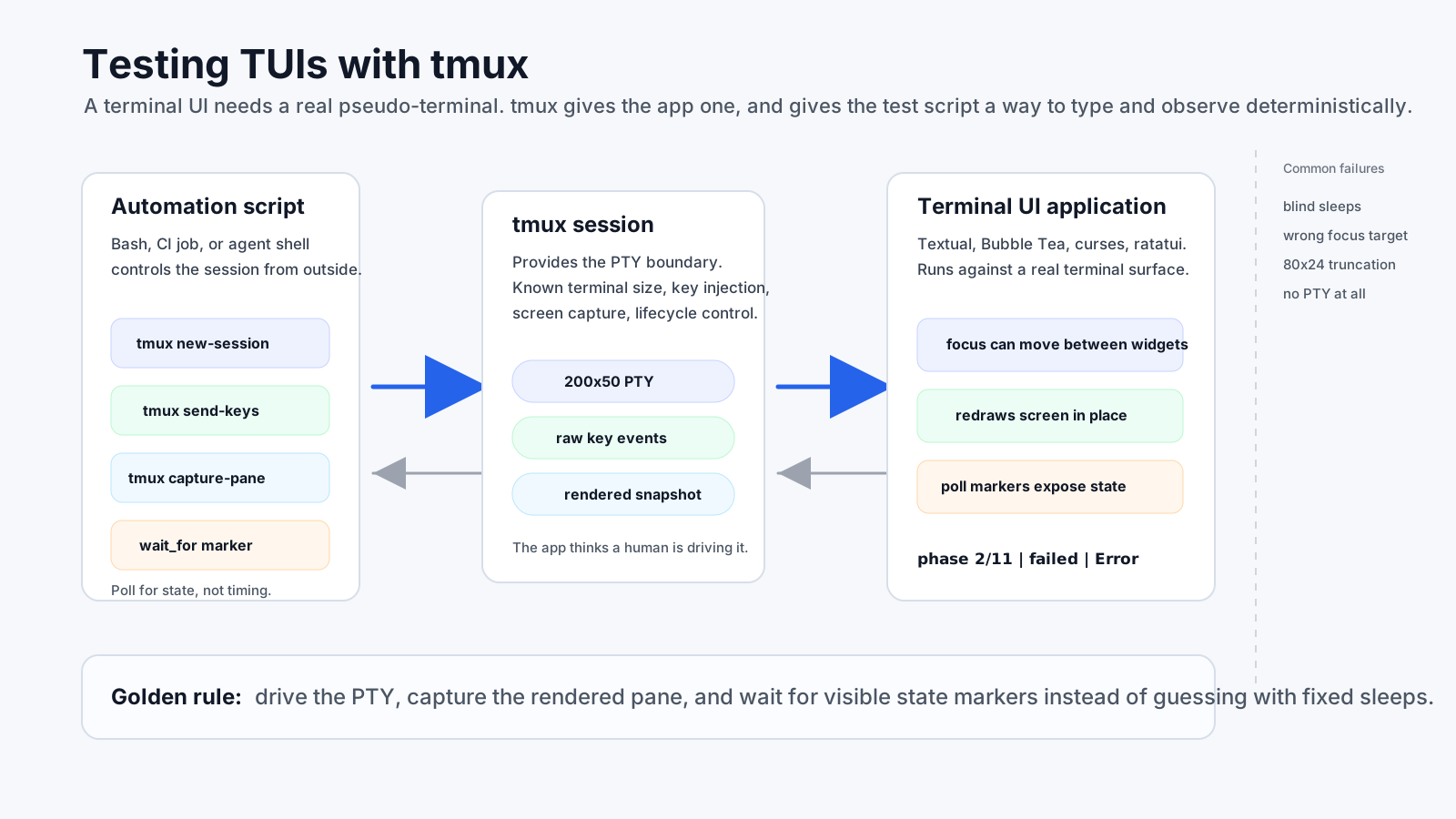
A terminal UI (TUI) is a stateful screen attached to a terminal device, and testing it with tmux means driving a real PTY. Piping text into stdin does not reproduce key events, focus, dimensions, raw mode, or in-place rendering.
Testing a TUI is not a stdin/stdout problem. It is a PTY problem.
For a black-box smoke test, tmux supplies both sides of the boundary: a pseudo-terminal for the app and commands for the test to send keys, resize the viewport, and capture visible state.
Quick recipe
session="tui-smoke-$$"
socket="tui-smoke-$$"
tmux -L "$socket" new-session -d -s "$session" -x 120 -y 36 \
  'export TERM=screen-256color; python -m myapp.tui'
tmux -L "$socket" capture-pane -t "$session":0.0 -p
tmux -L "$socket" send-keys -t "$session":0.0 n
tmux -L "$socket" kill-server
Use a unique socket, set dimensions, wait for visible state instead of guessing a delay, and always clean up. The complete fixture below packages those rules.
Download the tmux smoke-test fixture
The Black Box Problem
Normal CLI tooling assumes a Unix contract:
- input arrives on stdin
- output arrives on stdout
- the process emits text linearly
TUIs violate every one of those assumptions.
They inspect terminal dimensions through ioctl, capture individual keypresses in raw mode, paint a two-dimensional screen buffer with ANSI escape sequences, and often maintain internal focus state that decides whether a key triggers an app action or is just typed into a widget.
That means two common automation strategies fail immediately:
| Naive approach | Why it fails |
|---|---|
echo "n" | my-tui |
The app wants a real terminal, not a pipe. |
my-tui > output.txt |
You capture escape noise, not stable semantic state. |
| Fixed sleeps between keypresses | You are guessing timing instead of observing state. |
If you want deterministic testing, you need something that behaves like a terminal from the app's perspective and like an automation surface from your script's perspective.
The tmux Bridge
tmux is usually described as a terminal multiplexer for humans. For testing, it is more useful to think of it as a PTY broker with a CLI control surface.
The core testing API collapses to four operations:
# 1. Start the app detached with a known terminal size
tmux -L tui-test new-session -d -s app -x 120 -y 36 'uv run film-pipeline-tui'

# 2. Type into it
tmux -L tui-test send-keys -t app 'n'
tmux -L tui-test send-keys -t app Tab Enter

# 3. Read the rendered screen
tmux -L tui-test capture-pane -t app -p

# 4. Clean up
tmux -L tui-test kill-server
That is the core loop. Everything else is about making those four calls reliable.
Start with a Real Terminal, Not the Default One
The first trap is detached-session size. Do not let environment-specific defaults decide the viewport. Modern TUIs truncate panels, collapse sections, and hide labels as dimensions shrink.
tmux new-session -d -s app -x 200 -y 50 'uv run film-pipeline-tui'This matters more than people expect. A marker can be "present" in the UI but still missing from your assertions because the relevant column was clipped or wrapped away. If you are testing tables, status bars, or multi-panel layouts, set an explicit size large enough for the widest case you need to verify.
If the screen comes back blank or garbled, force a sane terminal type:
tmux new-session -d -s app \
  "export TERM=screen-256color; cd '$(pwd)' && python -m myapp.tui"
And always kill stale sessions before starting a run. A zombie session silently receiving your keys is one of the easiest ways to manufacture nonsense.
Determinism over Hope
The testing pattern that actually scales is not "press a key and sleep two seconds." It is "press a key and poll the rendered screen until a marker proves the app reached the next state."
wait_for() {
  local pattern=$1 timeout=${2:-30}
  local deadline=$((SECONDS + timeout))
  until tmux capture-pane -t app -p | grep -qE "$pattern"; do
    if (( SECONDS >= deadline )); then
      echo "TIMEOUT waiting for: $pattern" >&2
      tmux capture-pane -t app -p >&2
      return 1
    fi
    sleep 0.5
  done
}
This is the difference between a fragile demo and a real black-box test.
Two rules make the polling pattern work:
- Poll for the outcome, not the acknowledgment. A toast saying "submitted" is weaker than a screen showing the next phase is actually running.
- Match failure states too. If your pattern only knows the happy path, every real error becomes an infinite wait.
wait_for "phase 2/11|failed|Error" 300If you own the app, help yourself by rendering an explicit busy indicator or state marker. A visible loading or phase 3/11 label is not just good UX. It is test infrastructure.
The Focus Trap That Breaks Everything
The number one reason automated TUI tests "randomly" stop working is focus.
In a screen with an active input, pressing a does not necessarily trigger your "approve" action. It might just type the literal character a into the form field. The same applies to global bindings like g, q, or /.
The defensive rules are simple:
- Drive forms with
Tabso you always know where focus is. - Insert short pauses after structural transitions such as opening a modal or dropdown.
- Treat every screen containing an input as hostile to single-key global bindings until proven otherwise.
- When in doubt, capture the pane. The evidence is usually on the screen.
That last point is worth stressing. If a keybinding is being swallowed by an input, capture-pane often shows the stray characters sitting inside the field. The failure is visible. That is what makes this test strategy debuggable.
A fixture you can release with the application
The downloadable fixture uses set -euo pipefail, an isolated tmux socket, an exact pane target, cleanup traps, configurable dimensions, and state-based polling. Configure it without editing the script:
APP_COMMAND='uv run film-pipeline-tui' \
READY_PATTERN='LANGGRAPH FILM STUDIO' \
NEXT_KEY='n' \
NEXT_PATTERN='New project' \
WIDTH=120 HEIGHT=36 \
./tmux-tui-smoke-test.sh
The project-specific version can continue from there: fill one form, complete one phase, restart the app, and verify durable state. Keep that journey short. A smoke test should protect operability, not duplicate the application’s full functional suite.
Test a terminal-size matrix
| Viewport | Purpose | Suggested assertion |
|---|---|---|
| 80 × 24 | Minimum supported terminal | No crash; primary action remains reachable |
| 120 × 36 | Normal laptop terminal | Core labels and navigation are visible |
| 200 × 50 | Wide operator layout | Secondary panes use available space |
These are test cases, not universal support requirements. Publish your own minimum viewport and assert behavior at the boundary. Use tmux resize-window -x … -y … when resize handling itself is part of the contract.
Failure Modes Worth Memorizing
| Symptom | Likely cause | Fix |
|---|---|---|
| Keys do nothing | Input widget has focus | Track focus, use Tab, recapture the pane. |
| Assertion fails even though the text exists | Pane too small or table cell truncation | Increase -x/-y; assert on visible prefixes. |
| Capture is empty | Startup crash or bad TERM |
Run foreground once; force screen-256color. |
| Flaky timing | Fixed sleeps | Poll for state markers instead of guessing. |
| Second run behaves differently | Stale tmux session or persisted app state | Kill the session first and isolate test state. |
| UI freezes mid-test | Blocking work on the UI thread | That is an app bug; move work into background workers. |
Where tmux fits in the test pyramid
You should not build your entire test pyramid around tmux. It is slower, rendering-coupled, and intentionally black-box.
But that is also its value.
For a complex TUI, tmux catches a class of failures that in-process tests miss:
- broken keybindings
- focus traps
- layout truncation at realistic terminal sizes
- UI thread blocking under real interaction timing
| Layer | What it proves | Typical frequency |
|---|---|---|
| Unit | Reducers, formatting, view-model logic | Every change |
| Framework harness | Widget state, messages, bindings, async behavior | Every change |
| tmux PTY smoke | Packaging, terminal boundary, focus, visible workflow | Pull request or release |
| Live-provider E2E | External integrations and real latency | Manual or scheduled |
Textual’s official test harness runs an app through run_test() and exposes a pilot for key presses and widget assertions. It is faster and more semantic than scraping a pane. Use it broadly; reserve tmux for the real-terminal contract that an in-process harness intentionally abstracts away.
Minimal CI job
tui-smoke:
  runs-on: ubuntu-latest
  steps:
    - uses: actions/checkout@v4
    - run: sudo apt-get update && sudo apt-get install -y tmux
    - run: ./scripts/install-project.sh
    - run: |
        APP_COMMAND='my-tui --test-mode' \
        READY_PATTERN='Dashboard' \
        ./resources/tmux-tui-smoke-test.sh
Use deterministic local or mock data in pull-request CI. Keep credentials and paid providers in a separate gated job.
Unit and harness tests prove your internals are coherent. A tmux script proves the terminal experience still works.
Why This Matters for Agents
Agents can generate and operate terminal-first tools, but the same acceptance rule applies: do not accept a transcript that bypasses the real interface. Give the app a PTY, drive the published bindings, and retain the pane capture on failure.
References
Protect the terminal boundary before the next release.
Get the Test Fixture