The Plan-and-Execute Pattern
Orchestrating Complex Tasks
Prerequisites
On this page
- If You Only Read One Section
- Prerequisites
- 1. The Data Model: JSON Schema & The DAG
- 2. The Re-Planner: The Brain of the System
- 3. Robust Implementation (Pseudocode)
- 4. Decision Matrix: ReAct vs. Plan-and-Execute
- 5. When to Use Plan-and-Execute
- 6. Example: Due-Diligence Report on a Startup
- 7. Common Pitfalls & Prescriptive Mitigations
- Summary
- What's Next?
- Related Chapters
- Frequently Asked Questions
- Glossary Terms Introduced
- Revision History
Reading time: 12 min | Last revised: 2026-06-28 | Version: 1.3
If You Only Read One Section
Plan-and-Execute decouples high-level strategy from low-level action. By creating an explicit Plan (a structured task list) before execution, agents avoid "myopia." Use this for multi-step, non-linear projects requiring high reliability.
Prerequisites
- Chapter 1: The ReAct Pattern — understanding iterative execution.
1. The Data Model: JSON Schema & The DAG
A plan must be machine-readable and validatable. In this pattern, we treat the task list as a Directed Acyclic Graph (DAG), where tasks can only be executed once their dependencies are resolved.
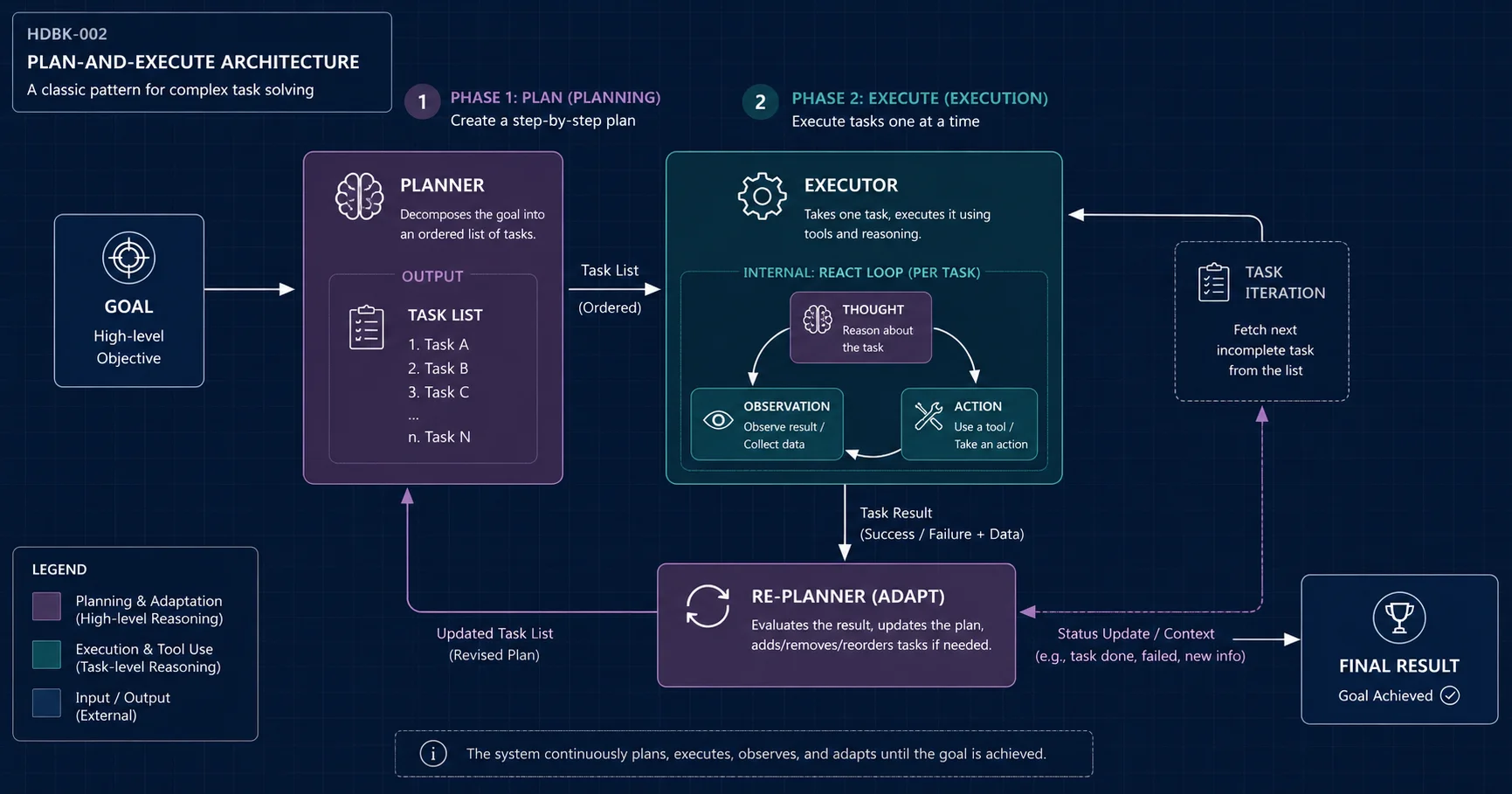
ReAct Lives Inside the Executor
Plan-and-Execute does not replace ReAct; it wraps it. Each individual task in the plan is usually executed through an iterative loop—often a ReAct loop (Chapter 1). The Planner decides what to do, the Executor decides how to do it step-by-step, and the Re-Planner adapts when reality diverges from the plan.
{
  "$schema": "http://json-schema.org/draft-07/schema#",
  "type": "object",
  "required": ["goal", "tasks"],
  "properties": {
    "goal": { "type": "string" },
    "tasks": {
      "type": "array",
      "items": {
        "type": "object",
        "required": ["id", "task", "deps", "status"],
        "properties": {
          "id": { "type": "integer" },
          "task": { "type": "string" },
          "deps": { "type": "array", "items": { "type": "integer" }, "description": "IDs of tasks that must be 'done' first." },
          "status": { "enum": ["todo", "in_progress", "done", "failed", "blocked"] },
          "result": { "type": "string" }
        }
      }
    }
  }
}
2. The Re-Planner: The Brain of the System
The Re-Planner is an LLM call triggered after each execution. Its job is to handle the "Reality Check": given the result of the last task, should we continue, retry, or rewrite the future?
Re-Planner Logic: Retry vs. Skip vs. Abort
- Retry: If the error is transient (e.g., rate limit), stay on the current task.
- Skip/Modify: If the error revealed the goal is impossible as planned, rewire future
depsor inject a "Discovery" task. - Abort: If a critical dependency failed and no alternative exists, transition the Plan status to
terminal_failure.
3. Robust Implementation (Pseudocode)
def get_ready_tasks(plan: Plan) -> List[Task]:
    # Returns tasks where status == "todo" AND all dependencies are "done"
    return [t for t in plan.tasks if t.status == "todo" and
            all(plan.find(d).status == "done" for d in t.deps)]

def plan_and_execute(goal, tools):
    plan = planner.generate_initial_plan(goal)
    max_replans = 3
    replan_count = 0

    while plan.has_incomplete_tasks():
        ready_tasks = get_ready_tasks(plan)

        # Check for deadlock: nothing is running, nothing is ready, but work remains
        if (not ready_tasks and
            not any(t.status == "in_progress" for t in plan.tasks) and
            any(t.status in ("todo", "blocked") for t in plan.tasks)):
            plan = planner.replan(goal, plan, reason="deadlock_detected")
            continue

        for task in ready_tasks:
            try:
                task.status = "in_progress"
                task.result = executor.execute(task.task, tools)
                task.status = "done"
            except Exception as e:
                task.status = "failed"
                task.error = str(e)

        # Re-Planning Gate: Triggered by failure or new information
        if any(t.status == "failed" for t in ready_tasks) or planner.needs_update(plan):
            if replan_count >= max_replans:
                return "Goal aborted: Max replans exceeded."
            plan = planner.replan(goal, plan)
            replan_count += 1

    return summarize_results(plan)
4. Decision Matrix: ReAct vs. Plan-and-Execute
| Feature | ReAct | Plan-and-Execute |
|---|---|---|
| Best For | Reactive, few-step tasks. | Strategic, multi-step projects. |
| State | Implicit (Context). | Explicit (External JSON/DB). |
| Cost | 1.0x (Direct). | 1.5x - 3.0x (Planner calls + Re-planning). |
| Reliability | Drifts in long contexts. | High (Goal-oriented stabilization). |
5. When to Use Plan-and-Execute
Use Plan-and-Execute when: - The goal requires 5 or more dependent steps that must be tracked. - Some steps can run in parallel while others must wait. - Reliability matters more than latency (planning adds overhead). - The workflow is repeatable enough to justify a structured plan format.
Avoid it when: - The task is short and exploratory (ReAct is cheaper). - You cannot define a reasonable success criterion for each task. - The environment changes so fast that any plan becomes stale in seconds.
6. Example: Due-Diligence Report on a Startup
User request: "Prepare a 2-page investment memo on Acme Robotics. Cover team, market, product, traction, and risks."
The Planner generates an initial task list:
| ID | Task | Dependencies |
|---|---|---|
| 1 | Search founder backgrounds | — |
| 2 | Estimate market size | — |
| 3 | Analyze product / technology | 1 |
| 4 | Find traction signals (funding, customers) | 1 |
| 5 | Identify risks (competition, regulatory) | 2, 3, 4 |
| 6 | Write the memo | 5 |
The Executor works through ready tasks. Suppose Task 4 fails because the funding database is down. The Re-Planner sees the failure, checks MAX_REPLANS, and either:
- retries Task 4 after a delay,
- replaces Task 4 with "Search company blog and press releases for traction signals," or
- aborts if traction data is a hard requirement.
Once all dependencies for Task 6 are satisfied, the Executor synthesizes the final memo.
7. Common Pitfalls & Prescriptive Mitigations
- Over-Planning: Planner generates 20+ steps.
- Mitigation: Use a "Sliding Window" plan. Limit initial plans to 5-7 steps; the final step should be "Assess remaining goal."
- Plan Oscillation: Re-Planner loops between two failing approaches.
- Mitigation: Implement a global
MAX_REPLANScounter. If reached, use the approval or escalation policy from Chapter 7: Human-in-the-Loop, or fail safely. - Dependency Deadlock: Task A depends on B, and B depends on A (circular).
- Mitigation: Validate the JSON Plan against a Directed Acyclic Graph (DAG) check before starting execution.
Summary
- Plan-and-Execute separates strategy from action via a structured Task List.
- Explicit State Management using JSON/DAGs is required for long-running reliability.
- The Re-Planner provides the critical self-correction gate.
What's Next?
In Chapter 3: Reflection, we'll explore how to add a "Critic" agent that reviews work before it moves to the next step of the plan.
Related Chapters
- Chapter 1: The ReAct Pattern
- Chapter 3: The Reflection Pattern
Frequently Asked Questions
Q: Does Plan-and-Execute replace ReAct? No. In most implementations, the Executor uses a ReAct loop to carry out each individual task. Plan-and-Execute adds the planning layer above it.
Q: What makes a plan "good enough"? A good plan has clear, verifiable tasks; explicit dependencies; and a failure mode for each task. It does not need to predict every detail upfront.
Q: How do I detect a deadlock?
If no tasks are in_progress, no tasks are ready to start, and incomplete work remains (todo or blocked), the plan has a structural problem that requires replanning.
Q: Should the Re-Planner be the same model as the Planner? It can be, but using a different model or prompt persona for the Re-Planner reduces bias toward the original plan.
Q: Can tasks run in parallel?
Yes. The get_ready_tasks function returns all tasks whose dependencies are satisfied. You can execute them sequentially or in parallel, depending on your infrastructure.
Glossary Terms Introduced
- DAG (Directed Acyclic Graph): A directed graph with no cycles, used here to order dependent tasks.
- Re-Planner: The component responsible for updating a plan based on execution results.
- Deadlock: A state where no task can proceed because they all wait on incomplete dependencies.
Revision History
| Version | Date | Changes |
|---|---|---|
| v1.3 | 2026-06-28 | Major Revision: Added DAG logic, deadlock handling, and retry/skip/abort semantics. |
| v1.2 | 2026-06-28 | Added formal JSON Schema and prescriptive mitigations. |
| v1.0 | 2026-06-28 | Initial draft. |
Continue with more handbook chapters and related engineering patterns.
Read the Handbook